Plugins / Audio effect (mastering) ·
Afterlife Master: a mastering plugin that checks Spotify, Apple Music and Beatport loudness for you
A song's afterlife starts the day it's released. Afterlife Master shows what Spotify, Apple Music, YouTube, Beatport and six more will do to a master, finds the bar where it's too loud, where the bass takes over and where the stereo collapses to mono, then masters it as loud as it can go without being punished.
- Plugin
- ORIKLE Afterlife Master
- Type
- Audio effect (mastering)
- Formats
- AU, VST3, Mac
- Version
- 0.3
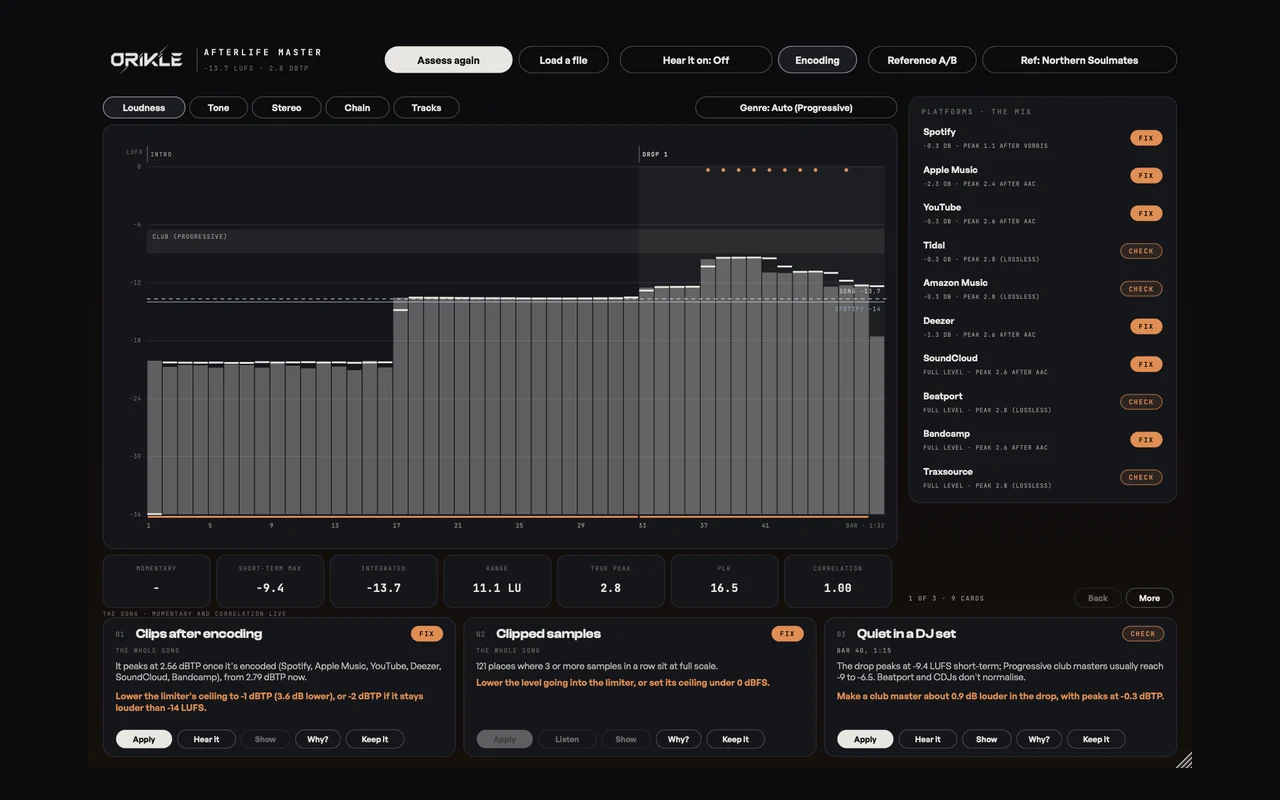
You finish a track, you master it, you release it. Then Spotify turns it down 4 dB, Apple Music turns it down 6, the AAC encoder pushes your carefully limited peaks over full scale, and on Beatport it is quieter than the record the DJ played before yours.
That is the song’s afterlife, and most of us never see it. So I built a tool that does.
Why I built it
Two reasons, and one of them is embarrassing.
The first is the loudness question. Every producer asks “how loud should my master be?” and gets five different answers. The honest answer is that it depends on where it is going. Streaming services normalise, so a master crushed to -6 LUFS gets turned down to the same level as everyone else and just sounds flatter. DJ platforms do not normalise, so on Beatport louder really is louder. One master cannot be right for both.
The second is the embarrassing one. When I ran my own released masters through the first version, both of them went over 0 dBTP once they were encoded. They were limited properly. The encoder put the peaks back. Nothing in my mastering chain had told me.
I wanted a tool that knows where the song is going and masters for each place, without guessing.
What it assesses
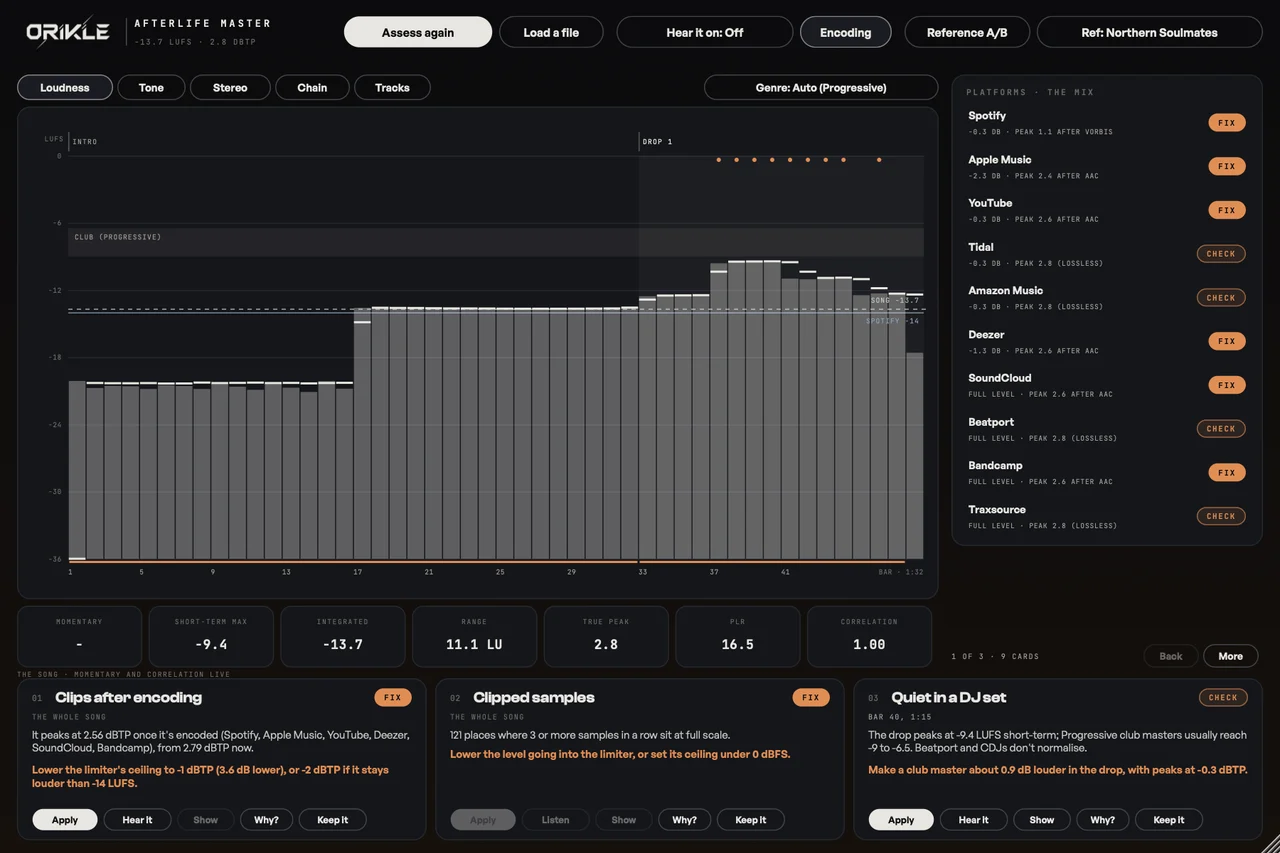
Press Assess and play the song from bar 1 (or drop a file in). It measures to the broadcast standard (BS.1770 and EBU R128, true peak at 4x) against Ableton’s own bar numbers, then writes up what it found as cards, each with its bars and time:
- Platforms: clips after encoding, peaks too close to full scale, squashed for streaming (and the level that would keep the punch), quiet on YouTube, quiet in a DJ set.
- Where: too loud here, the bass takes over, the bass could go harder (and by how much), the drop does not lift over the breakdown, and muddy, harsh, dull or boomy against your reference.
- Stereo: a stereo song that actually plays as mono, a section that could go wider, width that never moves, highs all in the centre, a lean to one side, a wide low end, out of phase.
- Delivery: clipped samples, DC offset, an end cut off, intro and outro in whole phrases for DJs, and the genre.
Click any platform to hear it as that platform plays it: its level, and with Encoding on, its encoder.
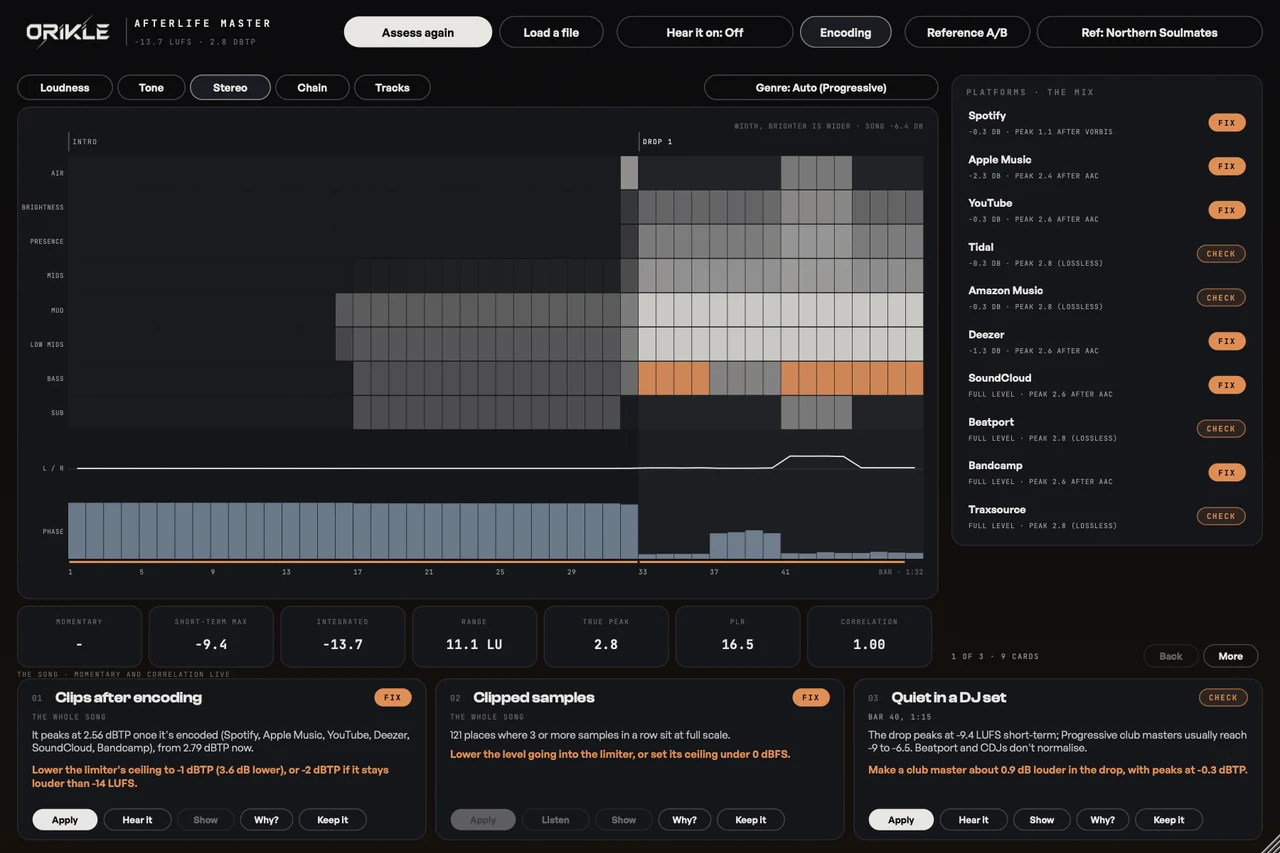
Pointless stereo
That stereo page came from a simple frustration: it is pointless releasing a track that is stereo but actually plays as mono because nothing in it was ever moved. Afterlife shows width per band per bar, so you can see the intro sitting dead centre, the breakdown that could open up, and the hats that would come alive panned. It is the most useful picture in the plugin, and I did not plan it until halfway through the build.
The master
Turn Master on and the chain does the work: EQ in mid and side with tone match to a reference, mono below a frequency, width in three bands, sub tighten, bass harmonics so the low end reads on phones, glue, three-band dynamics, a soft clipper and a true-peak limiter, then dither.
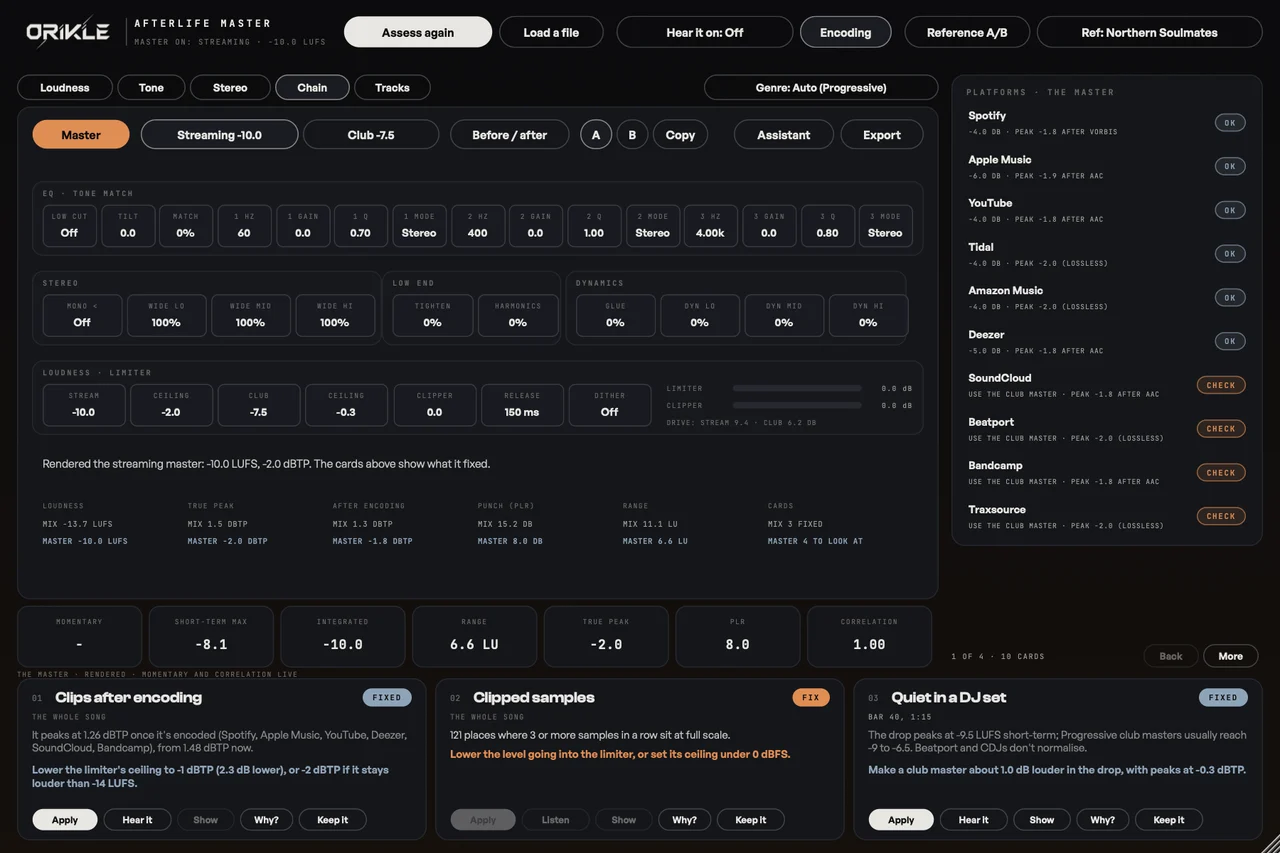
Two targets: Streaming (-10 LUFS at -2 dBTP by default, as Spotify asks for loud masters) and Club (-7.5 LUFS at -0.3 dBTP). Change anything and it renders the master offline, assesses it again like the song, and marks the cards it fixed as FIXED. Not “should be fixed”. Measured, fixed. Apply on a card makes its fix in the chain, Assistant applies every fix it can, Before / after compares at matched loudness, and Export writes both masters at 24 and 16 bit with a delivery report.
The cause
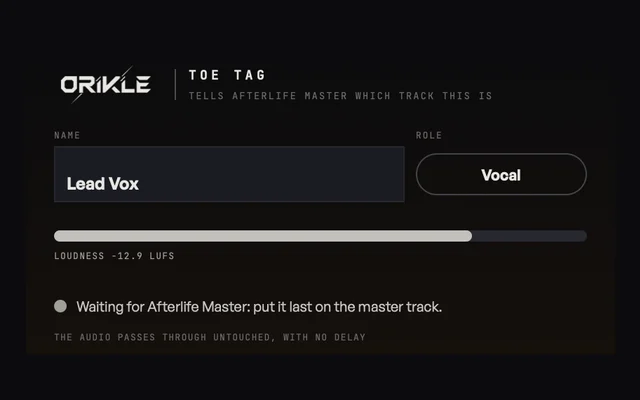
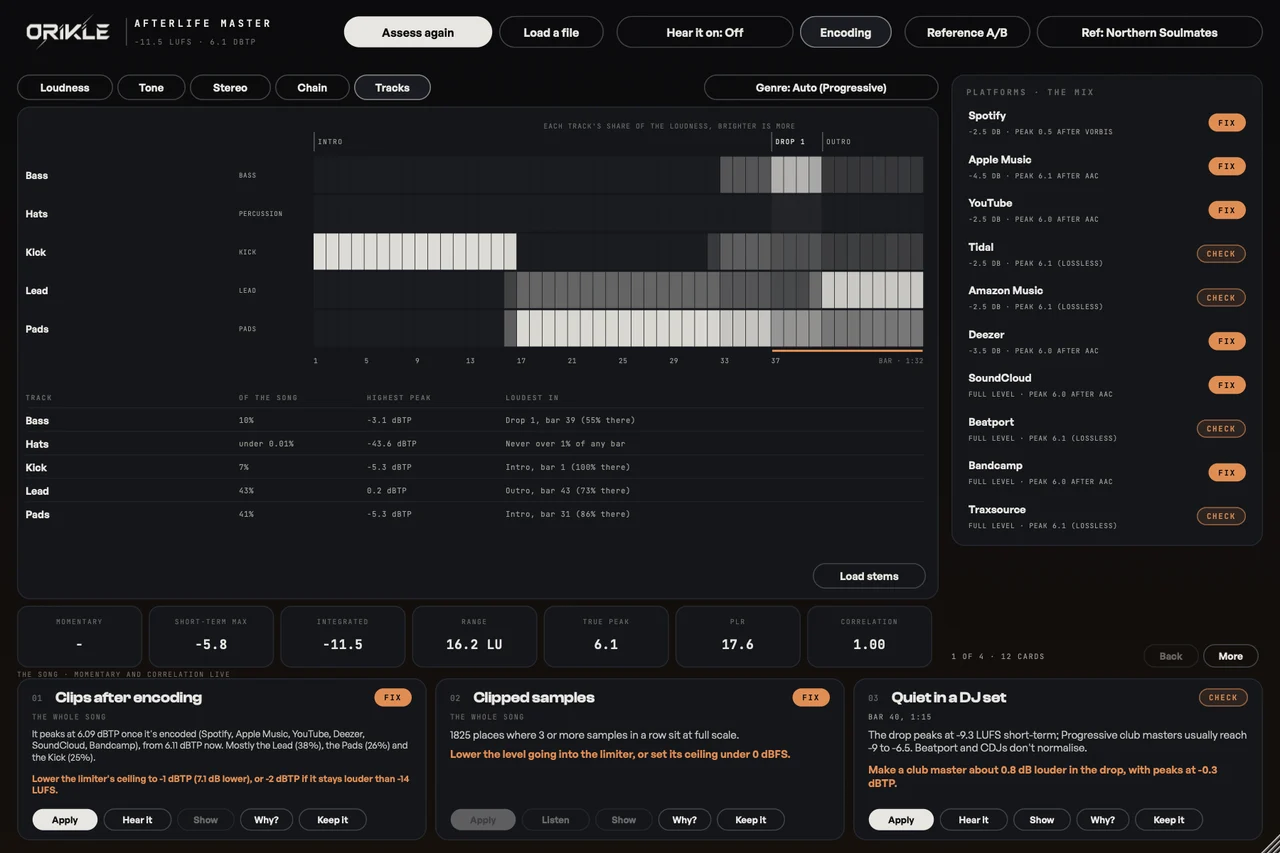
With Toe Tag on each track in Ableton (or a folder of stems), the cards name the track behind the problem: “Mostly the Bass (62%)”. It tells you when one track takes over the drop, when a track is never heard, which track makes the true peaks, whether the vocal is drowned or sitting on top (and what is in its way), and whether the kick and bass hit together instead of taking turns.
The benefits
- As loud as it can be, without being punished, for each place the song goes.
- Every finding has a bar number. “Too loud in bars 65 to 72” is a fix. “A bit loud” is a shrug.
- Hear it on Spotify before Spotify does. Its level and its encoder, in Ableton, in time.
- Proof, not promises. FIXED only appears when the rendered master has been measured again.
- The track behind the problem, not just the symptom.
- Two masters, one click, with a delivery report for the distributor.
How I use it on a track
Last on the master track. Assess the mix against Northern Soulmates as the reference, read the cards with Toe Tags on, fix the mix first (the master cannot give back punch the mix already lost), then Master on, Assistant, Before / after, Export. The car test still has the final say, as I wrote in the AI in Ableton guide, but now I take two masters to the car instead of one.
The honest bit
It is version 0.3 and I am still tuning its genre numbers against more reference masters. And a confession for the Red Dwarf fans: Holly had an IQ of 6,000 and still lost the plot. Afterlife Master has ten platforms’ worth of rules and no plot to lose, but your ears still decide.
Questions about Afterlife Master
+ What does ORIKLE Afterlife Master do?
It assesses a song for ten platforms (Spotify, Apple Music, YouTube, Tidal, Amazon Music, Deezer, SoundCloud, Beatport, Bandcamp and Traxsource) using BS.1770 loudness and true peak, including what AAC and Ogg Vorbis encoding does to the peaks. It reports problems bar by bar as cards, shows how the stereo moves through the song, guesses the genre, and masters the track with its own chain into a streaming master and a louder club master.
+ How loud should I master for Spotify?
Spotify turns everything down to about -14 LUFS, so extra loudness buys you nothing there and costs punch. Spotify's own advice for masters louder than -14 LUFS is to keep true peaks under -2 dBTP, because its encoding raises the peaks. Afterlife Master's streaming default is -10 LUFS at -2 dBTP, and it renders the master and checks it after encoding.
+ Why make a separate club master?
Beatport, Bandcamp, Traxsource and DJ software do not normalise, so in a DJ set louder really is louder. The club master defaults to -7.5 LUFS at -0.3 dBTP, and Afterlife Master tells you how your drop compares with your genre's usual club loudness.
+ Can it tell which track in my mix causes a problem?
Yes. With ORIKLE Toe Tag on your tracks, or a folder of exported stems, each card names the track behind it (for example the bass taking over in bars 37 to 40), and it checks whether the vocal is drowned or sitting on top and whether the kick and bass clash.
+ Can I buy Afterlife Master?
Not yet. I built it for my own records. DM the word AFTERLIFE to @orikle_music on Instagram if you want to know more or try it.